- Log in to the RCUH Financial Portal.
- Hover over your name in the upper‑right corner of the screen.
- Click on “Switch User”.
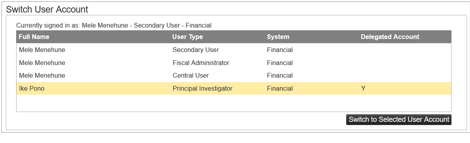
- Select the Delegated User account you would like to switch to and click on “Switch to Selected User Account”.
Was this article helpful?
That’s Great!
Thank you for your feedback
Sorry! We couldn't be helpful
Thank you for your feedback
Feedback sent
We appreciate your effort and will try to fix the article